Introduction
Having finally finished the Spring '25 college semester, I finally have time to work on some passion projects. This summer, I will be starting my first homelab using an Optiplex 9020 with the following specifications:
- RAM: 32 GB, 4 sticks of 8 GB each
- Storage: 512 GB internal HDD
- CPU: Intel Core i7-4790, 4 cores w/ 2 threads each
Through this project, I hope to get a better understanding of network and system administration.
Objectives
My current goals for this homelab are as follows:
Limitations
I am building this homelab on my home network. There are some limitations because of this. For example, my room is far from the router and the optiplex does not have a native Wi-Fi adapter, so I have hardwired it into the network through a repeater. Additionally, the modem/router at my house does not allow certain functions, like setting a custom DNS configuration and static routes. As such, certain parts of the project will either be postponed for a later date or scaled down. I may, for example, limit the Pi-hole to be used only through my personal devices instead of set up at the edge of the network at the router.
Base Level: Proxmox
The initial setup for this project was easy with the help of Ben Heater's tutorials. Accordingly, I installed Proxmox as the host OS/hypervisor for all VMs used in this first part of my homelab. Proxmox is a type 1 hypervisor that functions both as an operating system and a control for all virtual machines and containers. It is also used to set up virtual networking devices (i.e. switches) to manage the virtual network created within. After initial setup, I used my laptop to access the web interface from anywhere in my home.
The Internal Network
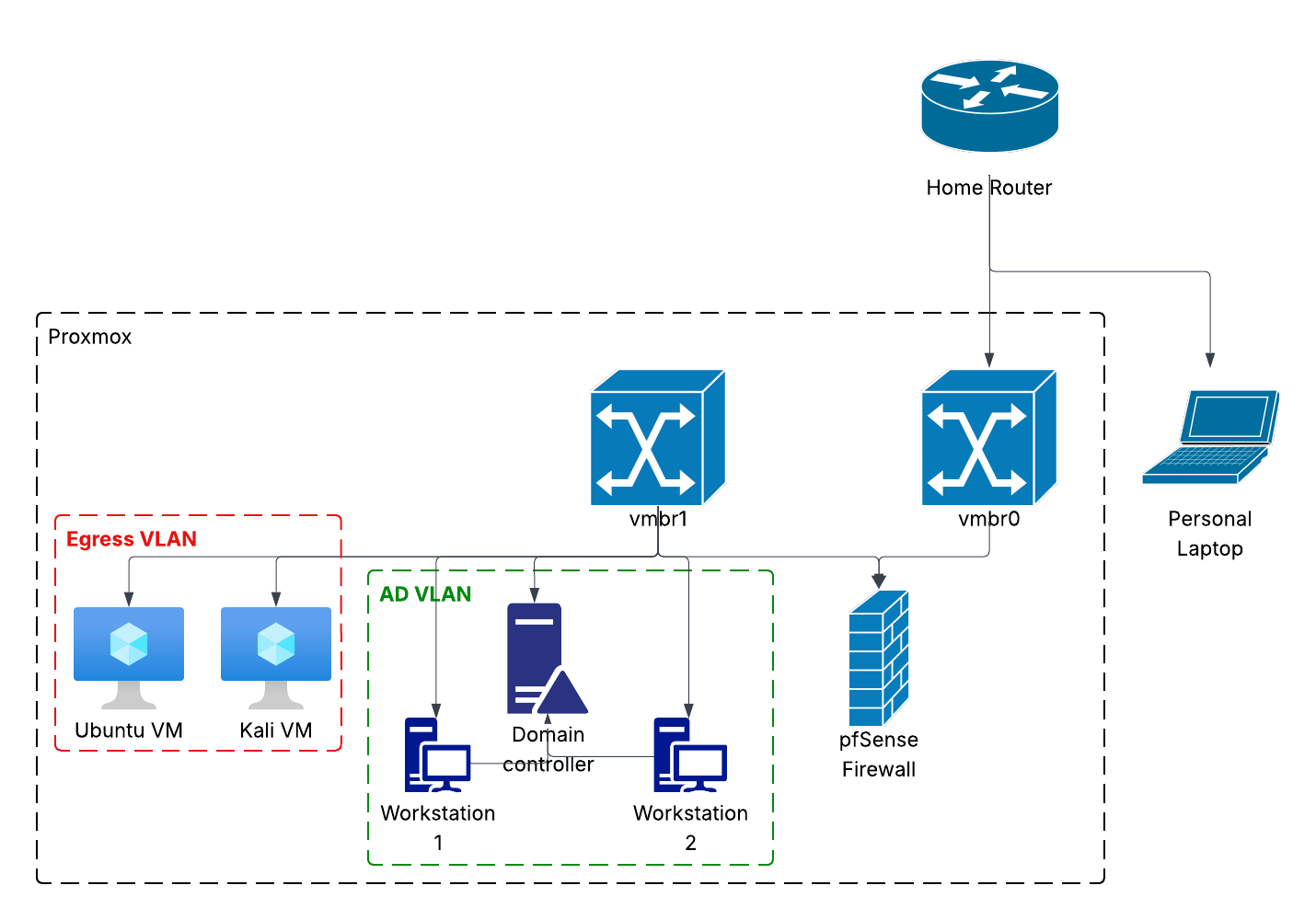
The front-facing network interface is vmbr0 and connects to my home LAN. The internal network interface is vmbr1 and connects to my Proxmox LAN. VMs can be directly connected to vmbr0 to have access directly to the home LAN, or they can be routed through vmbr1. The former was used for the pfSense firewall, allowing it to monitor all traffic that passes from Proxmox to the larger home LAN. All other VMs currently active were routed through vmbr1 and assigned one of two VLAN IDs. VLAN 666 (Egress) was for internal VMs requiring access to the internet. VLAN 111 (Pan AD) was for the Windows Active Directory (AD) Lab.
pfSense Firewall
As seen in the diagram above, the firewall is used to set rules for all of the VLANs and interfaces. As it was connected directly to vmbr0, I could access the web interface from my personal laptop with no issues. Although I had done some work with firewall rules in the past through my coursework and naval internship, I used this time to become more familiar with pfSense's many features, including aliases, VLANs, DHCP leasing, etc. Once again following Ben Heater's guides, I created aliases for both the Kali and Ubuntu machines, and the ports that allow access to web interfaces. This allowed me to streamline work when actually adding the rules to the firewall. As an example, I included the WAN (vmbr0) interface rules below.
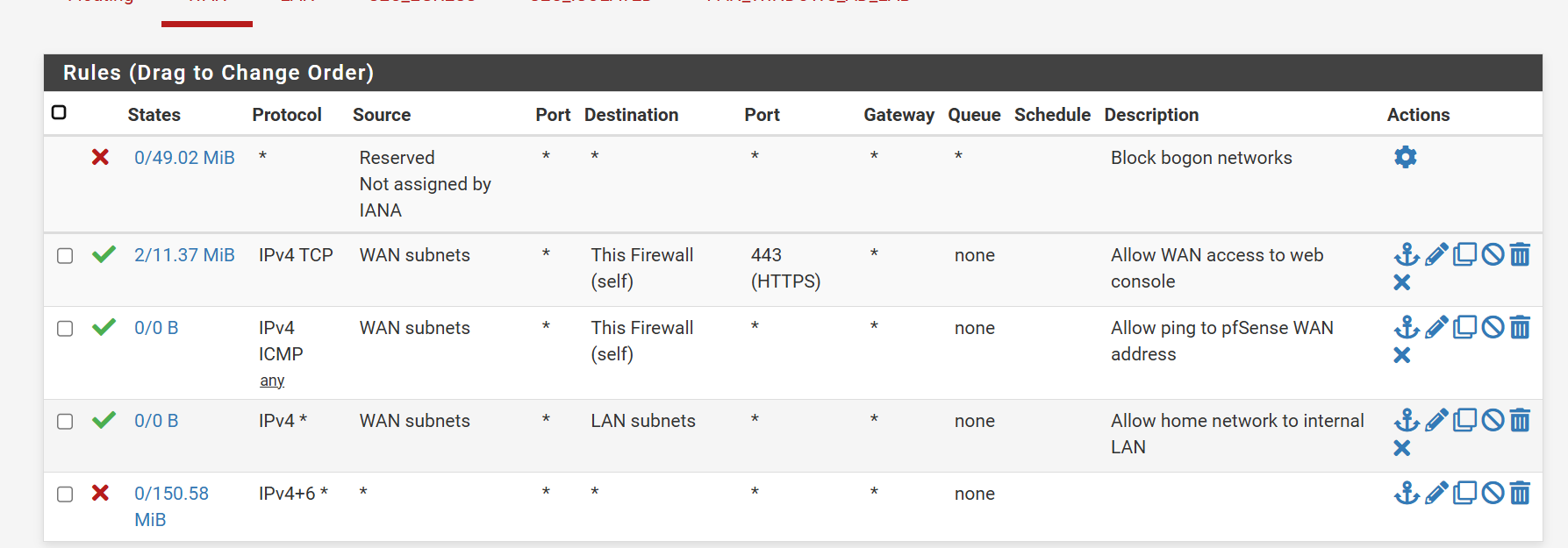
All rules are described on the right side. The bottom rule blocks all traffic not explicitly allowed by an earlier rule. Similar rules were set up for the LAN, Egress, and Pan AD interfaces. For the Pan AD in particular, access was restricted to internal only. Machines on that VLAN could not access the internet or any other devices on the larger Proxmox network. The only exception to these rules was the Kali machine; I plan to use the Active Directory lab in the near future to practice for The Cyber Mentor's Practical Network Penetration Tester (PNPT) certification and need the Kali machine to attack it.
Pan Active Directory Lab
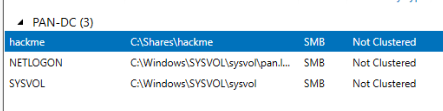
The active directory lab is modeled off of The Cyber Mentor's lab in the Practical Ethical Hacker (PEH) course. It currently consists of a Windows Server domain controller (PAN-DC) and 2 Windows workstations connected to the domain. There are 3 shares on the AD server, including one manually added hackme share, to be exploited later. I connected to these shares on each of the workstations through File Explorer.
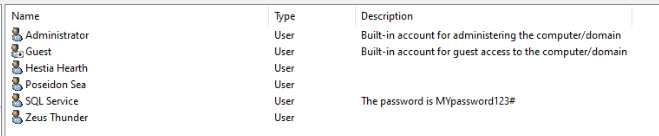
I have also created several user accounts, including one service account with the password stored in plaintext, as a practice for issues I may face in the wild. One workstation was "assigned" to Hestia Hearth and the other to Poseidon Sea.
I have also disabled Windows Defender to learn basic AD exploitation techniques. As I attack the system, I will detail steps taken to remediate issues, allowing me to learn both red team and blue team tools, techniques, and procedures (TTP) at the same time.
Next Steps
The next steps of my homelab are detailed in the objective section, but my immediate next steps are to install Wazuh to start learning about SIEM operation and analysis and hacking the Pan AD lab to study for my PNPT certification. I hope to take and pass the certification exam before returning to school in the fall.